

Keeping track of prepared food, opened ingredients and use-by dates is an essential part of running a safe and organised commercial kitchen. But handwriting dozens of labels every day takes time, creates inconsistencies and can lead to important information being difficult to read.
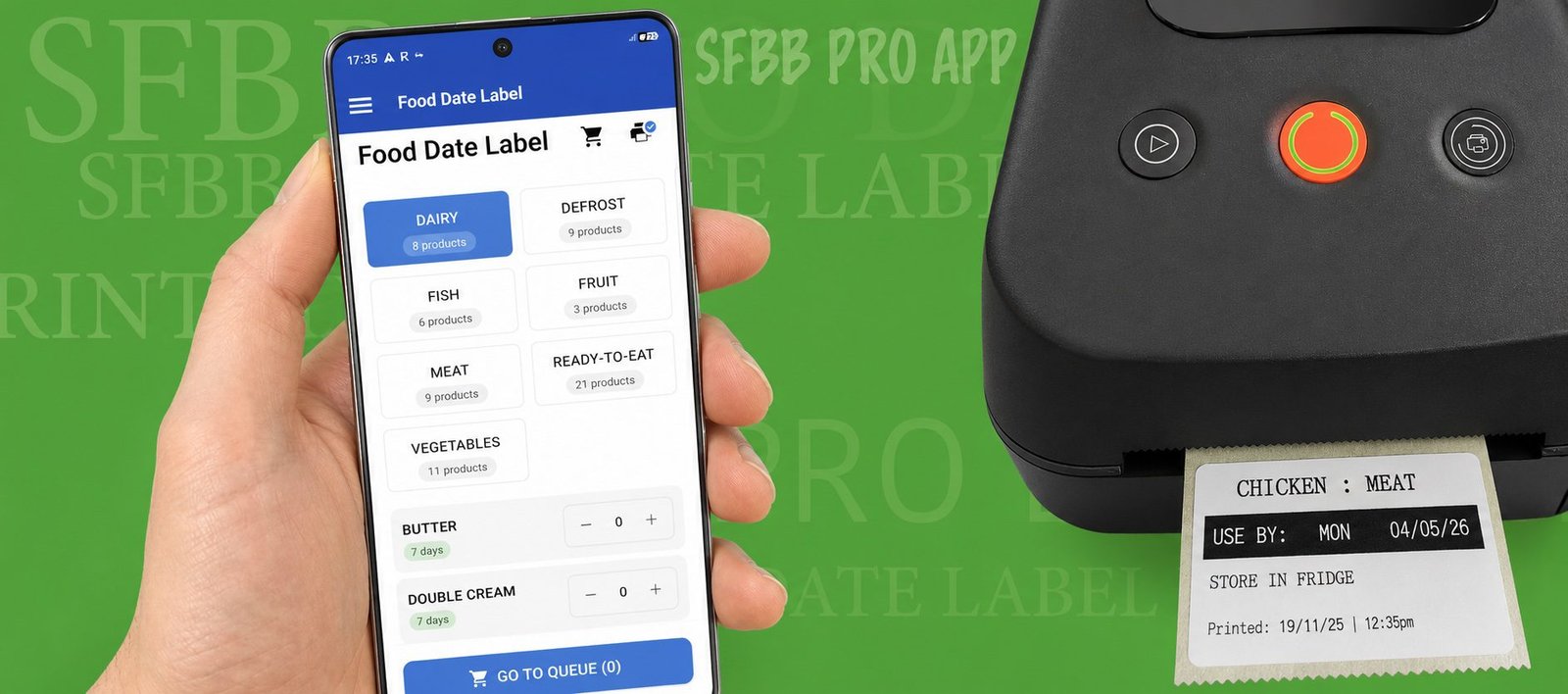
The SFBB Pro Date Label Printer provides a faster and simpler way for restaurants, cafés, takeaways, pubs, hotels and catering businesses to produce clear food date labels directly from the SFBB Pro app.
Instead of reaching for a pen every time something goes into the fridge or freezer, staff can select the food item, confirm the required information and print a professional label in seconds.
What Is a Date Label Printer?
A date label printer is a thermal printer designed to produce labels for food containers and prepared ingredients in commercial kitchens.
Labels can display important information such as:
- Food or product name
- Use-by or best-before date
- Time
- Storage information
- The team member who printed the label
SFBB Pro combines the physical printer with its digital food safety system, allowing businesses to manage their food labelling alongside their other kitchen food safety procedures.
Why Use the SFBB Pro Date Label Printer?
Save Time Every Day
Handwriting food labels might only take a few seconds each, but those seconds quickly add up.
A busy commercial kitchen could need to produce 50, 60 or even more food labels every day. Staff need to find a label and pen, write the product name, calculate the correct date and add any other required information.
With the SFBB Pro Date Label Printer, much of this process is automated.
Choose the item in the app and print the label.
For a busy kitchen, this can potentially save hours of staff time every week.
Automatically Calculate Food Dates
One of the biggest advantages of using SFBB Pro is that your commonly used food items can be configured in advance.
Using the SFBB Pro web administration area, you can create categories such as:
Meat | Fish | Dairy | Vegetables | Sauces | Desserts | Prepared Foods
Individual products are then added to each category.
For example, you could add Milk to the Dairy category and configure the appropriate number of days for refrigerated storage.
Once your products have been configured, kitchen staff don’t need to repeatedly calculate dates manually. They simply select the appropriate item when printing.
This helps create a faster and more consistent food labelling process across the kitchen.
Reduce Handwritten Labels
Anyone who has worked in a commercial kitchen knows what handwritten food labels can eventually look like.
Different handwriting, smudged ink and rushed labels can make information difficult to read.
A thermal food date label printer produces clean, consistent labels that are easy for the kitchen team to identify.
There is also no ink or toner cartridge to replace because the SFBB Pro printer uses thermal printing technology.
Designed for Commercial Kitchens
The SFBB Pro Date Label Printer isn’t a general office label maker adapted for kitchen use.
It has been developed specifically around the workflow of commercial food businesses.
It can be used by:
Restaurants
Cafés
Takeaways
Pubs and bars
Hotels
Bakeries
Catering companies
Commercial kitchens
Food preparation businesses
Whether you’re labelling freshly prepared sauces, opened dairy products, meat, fish or frozen ingredients, your commonly used products can be configured within SFBB Pro ready for your team to select.
Fridge and Freezer Labelling
Different products may require different storage periods depending on whether they’re kept refrigerated or frozen.
SFBB Pro allows products to be configured with their relevant storage settings so staff can select the appropriate item rather than repeatedly working dates out themselves.
This is particularly useful in larger kitchens where multiple employees are preparing and storing food throughout the day.
Know Who Printed the Label
Accountability is another benefit of moving away from completely handwritten labelling.
SFBB Pro can include the team member responsible for printing the label, helping managers identify who completed the task.
This fits naturally with the wider SFBB Pro system, where businesses can manage food safety records and see which team members have completed required checks.
One System for Food Safety and Date Labelling
The biggest advantage of the SFBB Pro Date Label Printer is that it isn’t a completely separate system.
SFBB Pro already helps commercial kitchens manage food safety records including opening and closing checks, fridge and freezer temperatures, delivery records, incidents and corrective actions, cleaning records and other important food safety documentation.
Adding food date labelling means another everyday kitchen process can be handled from the same system.
For multi-site operators, this can also help create more consistent procedures across different locations.
Easy to Set Up
Setting up the SFBB Pro food labelling system is straightforward.
First, log into the SFBB Pro website and open the Label Generator section.
Create the categories your kitchen uses, such as Meat, Fish, Dairy and Vegetables. Then add the individual food items within those categories and configure the appropriate date and storage information.
Once your products have been created, open the Print section of the SFBB Pro app.
Connect the Date Label Printer using Bluetooth, choose the food item and print your label.
Once the initial product list has been configured, everyday printing becomes extremely quick.
No Ink Required
The SFBB Pro Date Label Printer uses thermal printing, so there are no traditional ink cartridges or toner to purchase.
Simply load the compatible thermal food labels into the printer and you’re ready to print.
For kitchens producing hundreds of labels every week, this makes the system practical for everyday use.
A Better Way to Label Food
Food labelling is a small job that gets repeated hundreds or even thousands of times in a commercial kitchen.
That’s exactly why improving the process can make such a difference.
The SFBB Pro Date Label Printer gives kitchen teams a quick way to create clear, consistent food labels while reducing handwriting and repetitive date calculations.
For managers, it also helps standardise how food is labelled across the kitchen and integrates the process with the wider SFBB Pro food safety system.
Order the SFBB Pro Date Label Printer
The SFBB Pro Date Label Printer is available to order through Amazon, with next-day delivery available on eligible orders and locations.
Once your printer arrives, you can configure your food categories and products within SFBB Pro, connect the printer to the app via Bluetooth and start printing food date labels.
Looking for a faster way to label food in your commercial kitchen? Try the SFBB Pro Date Label Printer and replace handwritten labels with a faster digital process.

No comment