

Keeping food correctly labelled is an essential part of running a safe, organised commercial kitchen. But handwriting individual food preparation and expiry labels can take valuable time every day — particularly in busy restaurants, cafés, pubs, takeaways and catering kitchens. This is why so may restaruants and kitchens are searching for a food date labelling app to print labels and make life easier.
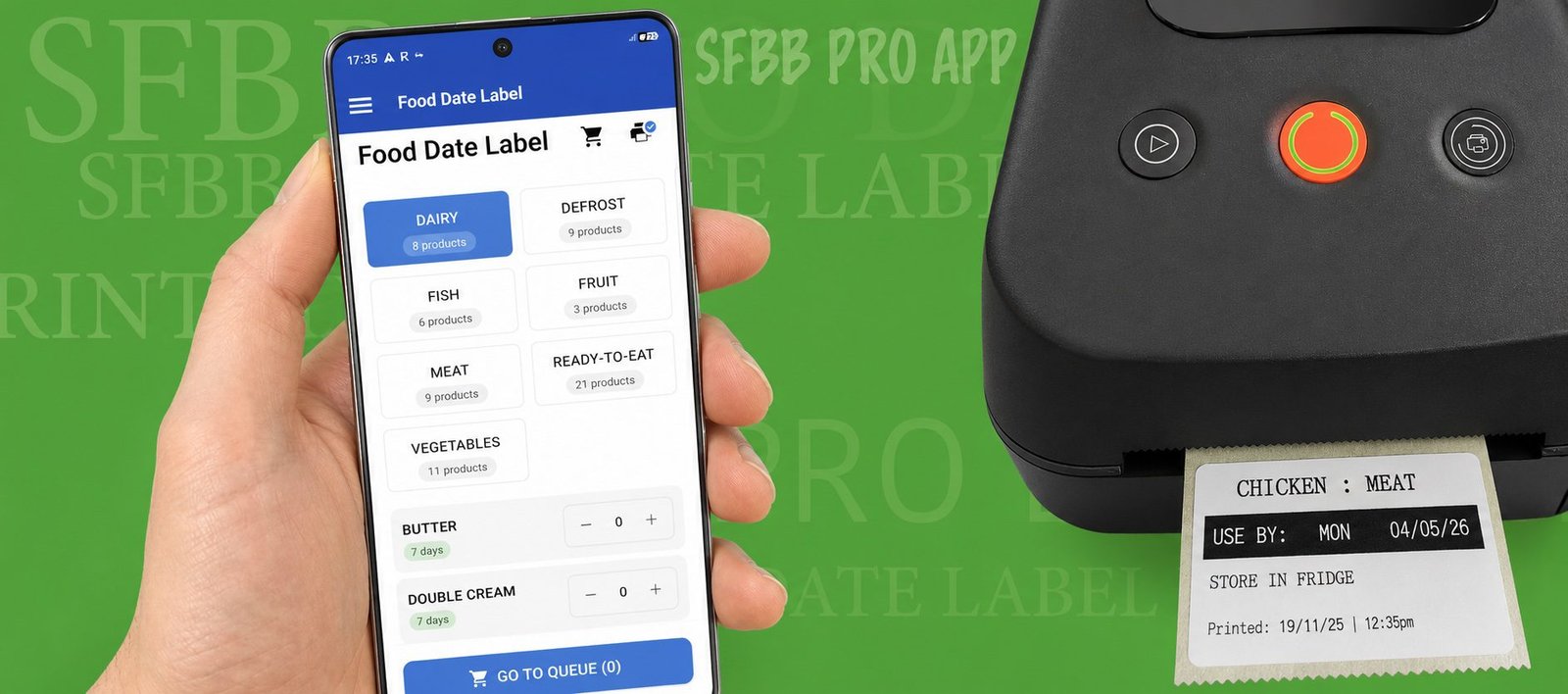
The SFBB Pro Date Label Printer makes food labelling faster and simpler. Create and print professional food date labels directly from SFBB Pro, helping your kitchen maintain consistent food safety procedures while reducing the time staff spend writing labels by hand.
1. What is the SFBB Pro date label printer?
The SFBB Pro Date Label Printer is a food labelling system designed specifically for commercial kitchens using SFBB Pro.
Instead of chefs and kitchen staff handwriting preparation dates, use-by dates and other information onto individual stickers, labels can be created digitally and printed in seconds.
Your kitchen can build a list of commonly prepared foods and ingredients inside SFBB Pro, including their normal shelf life. When a member of staff needs a label, they simply select the food item, choose the relevant date and print.
It creates a faster and more consistent approach to food labelling while integrating food date labelling with your wider digital food safety management system.
Whether you’re running a restaurant, café, pub, takeaway, hotel or catering kitchen, SFBB Pro provides one system for managing both your food safety records and kitchen food labels.
2. Is there a free trial?
Yes. SFBB Pro offers a 14-day free trial, allowing you to explore the food safety system and see how it could work within your kitchen before committing to a subscription.
You can set up your business, add your food items and explore SFBB Pro’s wider food safety features.
Alongside date labelling, SFBB Pro can help your kitchen manage opening and closing checks, temperature records, deliveries, incidents and corrective actions, cleaning records, allergen information and other important food safety records.
This means you’re not simply getting a food label printer — you’re adding food labelling to a wider digital SFBB food safety system.
The printer needs to be purchase from Amazon – this can be done by clicking below:
Buy SFBB Pro Food Date Label Printer
3. How fast can I get set up?
Once your SFBB Pro account has been created, you can add the foods and ingredients regularly used in your kitchen and set the appropriate shelf life for each item.
Connect your compatible SFBB Pro label printer and your kitchen can begin printing labels.
For frequently prepared foods, this can make everyday labelling extremely quick. Instead of repeatedly writing the same information onto stickers, staff can select the required item and print the labels they need.
If you’re moving away from handwritten date labels, you can gradually build your food list around the products your kitchen actually prepares.
4. What food labels can SFBB Pro print?
SFBB Pro can be used to create food date labels for your kitchen.
For example, you could create labels for:
- Prepared meats
- Cooked chicken
- Sauces
- Stocks
- Soups
- Fresh pasta
- Rice
- Prepared vegetables
- Desserts
- Homemade dressings
- Dips
- Meze
- Pre-prepared ingredients
- Defrosted products
- Batch-prepared foods
Simply program the date label function in the SFBB PRO admin dashboard and set the shelf-life of each dish and where it should be stored (ambient, fridge, freezer)
You can then quickly print the labels required during preparation.
This is particularly useful for kitchens that prepare large quantities of food at the beginning of a shift. Instead of handwriting dozens of individual stickers, staff can print the required labels in seconds.
The SFBB Pro label printer can print 100 food date labels as quickly as 90 seconds.
5. How does SFBB Pro food labelling help with compliance?
Effective date labelling supports good food safety management by helping staff identify what food is being stored and when it needs to be used or discarded.
SFBB Pro helps kitchens introduce a more consistent food labelling process.
Rather than relying on different members of staff to remember dates or interpret handwriting, your kitchen can establish agreed shelf-life periods for regularly prepared products and use these when producing labels.
The date label printer also sits alongside SFBB Pro’s wider digital food safety features, including:
Opening and closing checks
Create and complete daily kitchen checks digitally.
Fridge and freezer temperature records
Record and review refrigeration temperatures.
Delivery records
Keep digital records of incoming food deliveries.
Incident and corrective-action records
Record problems and the action taken to resolve them.
Allergen management
Keep important allergen information available to your team.
Cleaning records
Manage and record routine food hygiene tasks.
Digital reports
Quickly access your food safety records when they are required, including during an Environmental Health Officer visit.
Together, these features help businesses maintain organised, accessible food safety records and demonstrate the procedures being followed within the kitchen.
SFBB Pro should be used as part of your food safety management procedures; businesses remain responsible for determining safe shelf lives, storage conditions and food handling procedures appropriate to their products.
6. How much time will a food date label printer save my kitchen?
The biggest saving comes from removing repetitive handwriting.
Consider a kitchen that needs to produce 50 food labels during morning preparation.
Writing the product name, preparation date and relevant use-by information onto every individual sticker can quickly become a repetitive task.
With SFBB Pro, commonly used products can already be stored within the system. Staff select the food they are preparing and print the labels they require.
For busy kitchens producing dozens or even hundreds of labels each week, those small savings can quickly add up.
It can also make the preparation process easier for teams because everyone follows the same labelling system rather than individual members of staff having their own way of writing and dating products.
The result is a faster, clearer and more consistent kitchen labelling process.
7. Can I see a demo before I commit?
Yes. If you’d like to see how the SFBB Pro Date Label Printer works before introducing it into your kitchen, you can request a demonstration.
We can show you how food items are created, how shelf lives are configured and how quickly labels can be printed during everyday kitchen preparation.
You can also start with the 14-day SFBB Pro free trial to explore the wider food safety system.
About the SFBB Pro Date Label Printer
SFBB Pro is designed to make everyday food safety management simpler for UK commercial kitchens.
The SFBB Pro Date Label Printer brings food date labelling into the same digital system used to manage your food safety records.
Instead of having one system for food safety checks, another for allergen information and handwritten stickers for food labelling, SFBB Pro brings these everyday kitchen processes together.
It is particularly suited to:
- Restaurants
- Pubs
- Cafés and coffee shops
- Takeaways
- Hotels
- Commercial kitchens
- Catering businesses
- Fish and chip shops
- Bakeries
- Food production kitchens
- Businesses operating multiple locations
For businesses with several venues, SFBB Pro also provides multi-site management, allowing owners and operators to manage food safety across multiple locations.
Individual team member logins also make it easier to see who has completed food safety records, providing greater accountability across the kitchen.
A Food Label Printer Built Around Food Safety
There are plenty of generic label printers available, but SFBB Pro has been developed specifically around the needs of commercial kitchens.
The aim isn’t simply to print a sticker.
It’s to make food labelling part of an organised digital food safety system.
From preparing ingredients and printing food date labels to recording temperatures, completing daily checks and presenting records during an EHO visit, SFBB Pro helps put your kitchen’s essential food safety information in one place.
Ready to stop handwriting food date labels?
Start your 14-day free trial of SFBB Pro and discover a quicker way to manage food safety and date labelling in your kitchen.
SFBB Pro – digital food safety and food date labelling for modern commercial kitchens.
Buy the SFBB Pro Date Label Printer from Amazon here


No comment